


.jpg)

How to Optimize Your Salesforce Case Management for Better Customer Satisfaction
8 minCustomer satisfaction starts with how you handle cases. Salesforce gives teams a powerful toolbox, but getting the best results means combining smart configuration, clear workflows, and the right integrations. In this guide we show practical ways to tighten case workflows, use Service Cloud effectively, and introduce automation and AI where they move the needle. We’ll also explain how integrating PhoneIQ amplifies those gains so your agents resolve issues faster and customers leave happier.
Best practices for Salesforce case management that actually improve customer satisfaction
Improving case management is less about one big change and more about a few focused improvements that reduce friction for agents and customers. The items below help teams respond faster, stay organized, and deliver more consistent outcomes.
- Customize case layouts: Show agents the fields and related records they need for their role. Clean, targeted layouts cut search time and speed resolution.
- Route cases intelligently: Use skills-based and workload-aware routing so issues land with the right agent the first time. Smarter routing reduces handoffs and shortens response windows.
- Automate repetitive work: Automate status updates, notifications, and routine follow-ups so agents spend their time on judgement-based tasks, not data entry.
How customizing case layouts and record types boosts efficiency
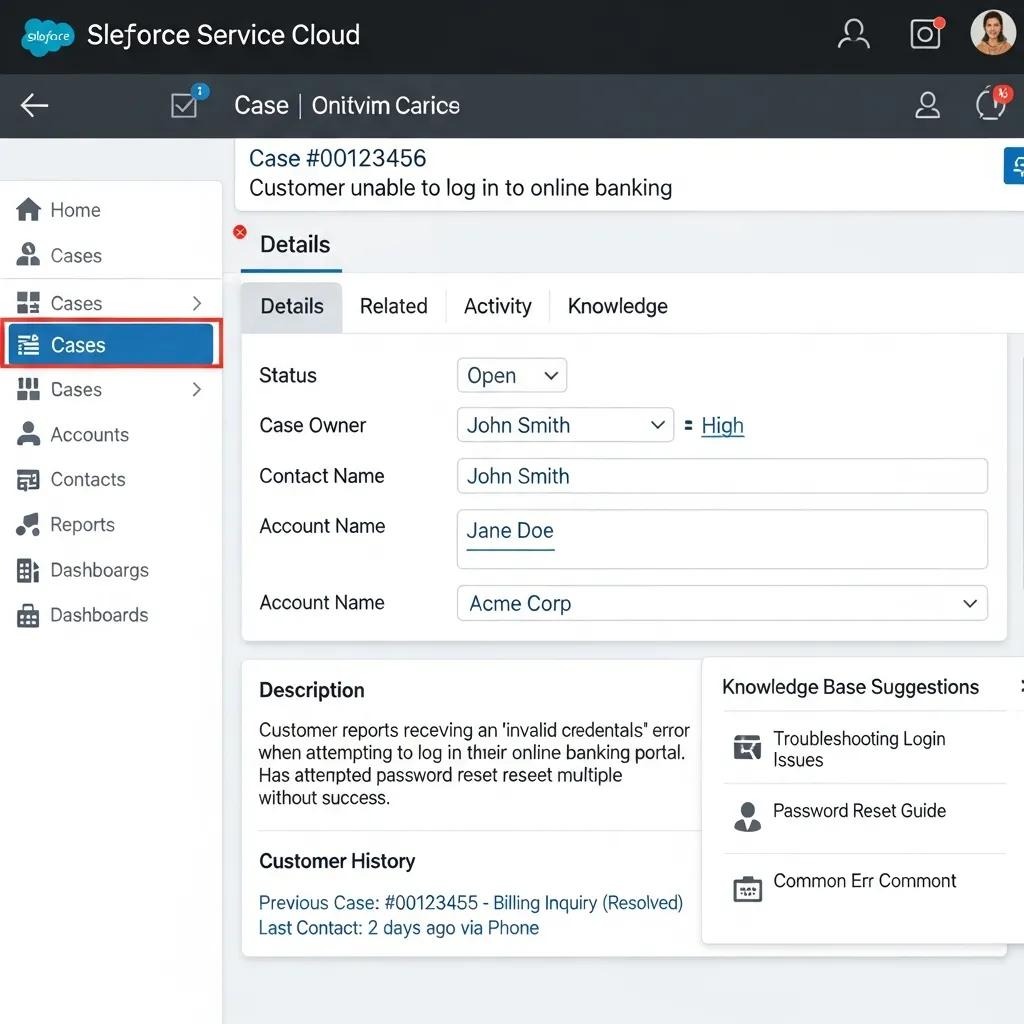
Tailoring case layouts and record types lets you surface the most relevant information for each team or role. Prioritizing critical fields and hiding noise reduces context switching and speeds up resolution. Agents spend less time looking for details and more time solving problems, which lowers queue times and raises customer satisfaction.
What effective assignment and routing look like in Salesforce
Good routing uses more than queues. Combine skills, availability, priority, and past performance to route each case where it’ll be handled fastest and best. Use visual flows to document routing logic, test with realistic loads, and iterate, that makes the process easier to maintain as needs change.
Leverage Service Cloud features to deliver a superior customer experience
Service Cloud gives you building blocks for faster, smarter service. When conpd with agent workflows in mind, those features turn daily support into a predictable, measurable advantage.
- Service Console optimization: Conp the console so agents have a single view of the customer, case history, related records, and quick actions, to resolve issues without app-hopping.
- Practical knowledge base: Maintain concise, searchable articles that customers and agents can use. Good self-service reduces incoming volume and helps customers find answers on their own time.
How a better Service Console increases agent productivity
A tuned Service Console gives agents everything they need in one place: contextual data, scripts, macros, and communication tools. That saves time on lookups and handoffs, shortens handle times, and helps agents keep interactions personal and consistent.
Why a strong knowledge base matters for self-service
A clear, easy-to-search knowledge base reduces repeat contacts and empowers customers to solve common problems themselves. Well-tagged content also speeds agent onboarding and ensures answers are consistent across channels.
How automation and AI can transform Salesforce case management

Automation and AI remove repetitive work and surface the right next actions. Used thoughtfully, they speed triage, improve routing, and free agents to focus on complex customer needs.
- Salesforce Flows and Macros: Build Flows to automate updates and escalations, and use Macros to handle common multi-step actions in seconds.
- AI-driven routing: Apply machine learning to match cases to agents based on historical outcomes, skills, and load, improving speed and accuracy over time.
Benefits of Flows and Macros for agents
Flows and Macros cut manual work and reduce human error. Automating routine touchpoints, follow-ups, owner changes, and status updates, shortens resolution cycles and gives agents more time for high-value conversations.
Research shows machine learning can extend automation by predicting the best next steps and reducing processing time across workflows.
Salesforce ML for Workflow Automation & Efficiency
This study evaluates how machine learning models applied to Salesforce data reduce task times, lower error rates, and increase user satisfaction. Results indicate ML can meaningfully improve automation outcomes when integrated into existing workflows.
Enhancing Salesforce with Machine Learning: Predictive Analytics for Optimized Workflow Automation, 2022
How AI-driven routing improves speed and accuracy
AI-driven routing analyzes historical case outcomes and agent performance to predict the best owner for each case. That raises first-contact resolution and shortens queues by reducing misroutes and repeated handoffs. Over time, the system improves as it learns from new interactions.
Multiple studies confirm that ML-based routing outperforms static, rule-based approaches on resolution time and satisfaction metrics.
Salesforce ML for Intelligent Case Routing & Customer Satisfaction
Traditional rule-based routing can struggle to scale and adapt. This paper compares rule-based and ML-driven routing and finds that ML techniques often deliver better classification accuracy, faster resolution, and higher customer satisfaction.
Using Machine Learning for Intelligent Case Routing in Salesforce Service Cloud, S Polamarasetti, 2022
Why integrate PhoneIQ call center management with Salesforce Service Cloud?
PhoneIQ is built to extend Salesforce with real-time telephony, call context, and reporting, so agents have the full conversation history and the right tools while they work the case. The result: fewer manual notes, faster resolution, and a smoother customer experience.
- Seamless integration: Automatic call logging and case creation ensure every interaction is captured and attached to the right record in Salesforce.
- Better service delivery: Intelligent call routing, screen pops, and real-time performance dashboards help agents respond faster and more personally.
Key benefits of Salesforce CTI integration with PhoneIQ
PhoneIQ’s CTI integration removes manual call entry, surfaces caller context during conversations, and gives managers visibility into call metrics. Agents work with complete records, which reduces handle time and increases accuracy in case notes.
How PhoneIQ features improve customer satisfaction and agent performance
Features like skills-based routing and performance analytics reduce wait times and improve first-contact resolution. Supervisors get actionable insights to target coaching, and agents get clearer guidance on where to focus, fueling continuous improvement.
How to measure and continually improve customer satisfaction in Salesforce
Measure what matters and create feedback loops. Use KPIs to monitor performance, collect customer input, and turn insights into incremental improvements.
- Key performance indicators: Track metrics like First Contact Resolution (FCR) and Customer Satisfaction Score (CSAT) to see how workflows affect experience.
- Feedback mechanisms: Use surveys, follow-ups, and case reviews to gather actionable feedback and close the loop with customers.
Which KPIs and metrics best reflect Service Cloud performance?
Focus on a small set of meaningful metrics:
- First Contact Resolution (FCR): Percentage of cases resolved on the first interaction, a direct proxy for efficiency and customer effort.
- Customer Satisfaction Score (CSAT): Direct feedback on how customers felt about the interaction.
- Average Response Time: How quickly you reply, a key driver of perception and retention.
How Salesforce reports and customer feedback drive continuous improvement
Combine quantitative reports with qualitative feedback to identify friction points and training opportunities. Use dashboards to monitor trends, then run targeted experiments to see what moves the metrics.
.kpi-section { font-family: inherit; margin: 40px 0; } .kpi-grid { display: grid; grid-template-columns: repeat(auto-fit, minmax(280px, 1fr)); gap: 24px; } .kpi-card { background: #ffffff; border-radius: 16px; padding: 28px; box-shadow: 0 8px 24px rgba(16, 24, 40, 0.08); border: 1px solid #eef2f7; transition: all 0.3s ease; position: relative; } .kpi-card:hover { transform: translateY(-6px); box-shadow: 0 16px 40px rgba(16, 24, 40, 0.12); } .kpi-title { font-size: 18px; font-weight: 600; color: #0b3d91; /* Brand primary blue */ margin-bottom: 12px; } .kpi-description { font-size: 14px; color: #667085; margin-bottom: 20px; line-height: 1.5; } .kpi-value { display: inline-block; padding: 8px 16px; border-radius: 999px; font-size: 13px; font-weight: 600; } .kpi-high { background: rgba(16, 185, 129, 0.1); color: #059669; } .kpi-low { background: rgba(239, 68, 68, 0.1); color: #dc2626; } @media screen and (max-width: 767px) { .kpi-card { padding: 22px; } }
First Contact Resolution (FCR)
Percentage of cases resolved on first contact.
High
Customer Satisfaction Score (CSAT)
Measure of customer satisfaction with service.
High
Average Response Time
Time taken to respond to customer inquiries.
Low
Tracking these KPIs regularly helps you spot regressions and validate improvements, a simple way to keep service quality moving forward.
Frequently Asked Questions
What are the key features of Salesforce Service Cloud that enhance case management?
Service Cloud offers the Service Console for a unified agent workspace, a knowledge base for self-service, and automation tools like Flows and Macros to remove manual work. Together these features create faster, more consistent support.
How can organizations effectively train their agents on Salesforce case management tools?
Combine role-based onboarding, hands-on exercises, and ongoing micro-training. Use real scenarios, shadowing, and short refresher modules tied to KPIs so training maps directly to performance.
What are common challenges when implementing Salesforce for case management?
Common hurdles include resistance to change, complex customization needs, and integration work. Mitigate these by engaging stakeholders early, prioritizing high-impact configurations, and validating integrations with pilot groups.
How can customer feedback be used to improve case management in Salesforce?
Collect feedback via surveys and follow-ups, analyze trends, and feed insights back into training, knowledge articles, and workflow tweaks. Closing the loop with customers shows you acted on their input and improves loyalty.
What role does data analytics play in optimizing Salesforce case management?
Analytics reveals where cases bottleneck, which agents need coaching, and which issues drive volume. Predictive models can forecast load and help staff appropriately. Use analytics to inform both tactical fixes and strategic investments.
How can organizations ensure a seamless integration of PhoneIQ with Salesforce Service Cloud?
Plan the integration with clear goals, define the scope (call logging, screen pops, routing), and test with a small group before full rollout. Work with PhoneIQ and Salesforce support teams and iterate based on pilot feedback.
Conclusion
Optimizing Salesforce case management is an ongoing effort: tune layouts, route smarter, introduce automation where it helps, and connect telephony with solutions like PhoneIQ to give agents context and speed. Those practical steps reduce friction, accelerate resolutions, and, most importantly, increase customer satisfaction. Ready to see how this works in your org? Discover how our solutions can help you raise the bar on customer service today.